Patient care, between the visits.
Althea Health is the modern patient portal companion to Althea Smart EHR. After each visit, patients automatically receive their clinical notes and after-visit summary, while lab results are posted in real time. Patients can schedule appointments, request prescription refills, pay balances, upload documents and securely chat with their care team, all through the iOS app or any web browser. The iOS app also allows patients to share health data directly from Apple Health.
 QR Code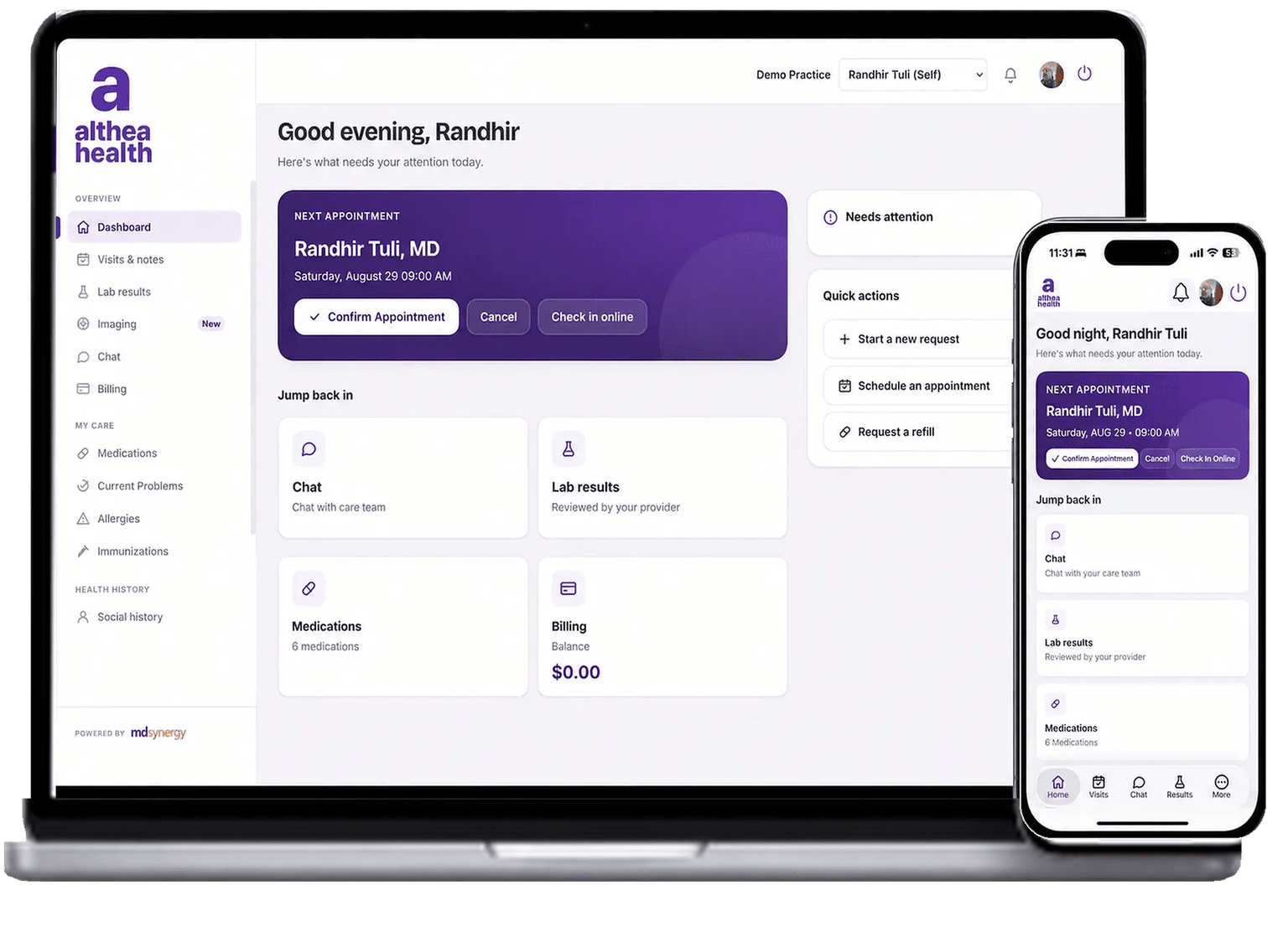


The front desk, extended to every patient's phone.
Real-time lab results. Automatic after-visit summaries. Digital check-in instead of clipboards. Althea Health turns your patient portal from a rarely-used website into the app your patients open every time something changes in their care.

Digital Check-In & Balance Pay
The days of filling out paper forms are over. Patients update demographics and clinical information directly in the portal, and pay outstanding balances by credit card from anywhere, anytime.
Visit Records & Lab Results
Patients get their after-visit summary and clinical notes automatically when the encounter closes, plus every past visit in one place, and lab results posted to the portal in real time.
Stay Connected Between Visits
Patients get SMS alerts the moment new information is available. They can request appointments, upload documents directly to their chart, and share Apple Health data, all from the portal.
From sign in to ongoing care.
In four steps.
Every patient, connected to your practice in four steps, from the first sign-in through every lab result, summary, and follow-up that comes after.
Patients use the Althea Health iOS app or sign in on the web, one account, accessible from iPhone, iPad, or computer.
SMS alerts the moment an after-visit summary, clinical note, or lab result is available in the portal, patients never miss an update.
Patients review past visits, update demographics and clinical info digitally, and sync Apple Health, no paper forms on arrival.
Patients request appointments, upload documents directly to their chart, and pay balances, staying connected between visits.
See the two-way flow.
Every action the practice takes posts to the patient's portal in real time, and every patient action lands directly in the chart.
In the Practice On the Patient's Phone Independently Rated. Federally Certified.
Physician Approved.


Althea Health Patient Portal
The essentials, patient experience, practice workflow, and compliance, answered briefly.
Patients can use the Althea Health iOS app on iPhone, or sign in at patientsynergy.com from any modern browser on iPad, Mac, or PC. One account, same experience, full access from anywhere.
When the provider signs the encounter, the after-visit summary and clinical notes are automatically delivered to the patient’s portal. Every past visit is retained in the portal with its own summary and notes, so patients always have their full history at hand.
In real time. The moment results come back from the lab and are released, they’re visible to the patient in Althea Health, no next-day delay, no separate login to a third-party lab site.
iPhone users can share data directly from the Apple Health app, blood pressure, heart rate, weight, activity, and more, with their provider. The data appears inside Althea Smart EHR as part of the patient record, so the provider sees real-world vitals between visits, not just in-office snapshots.
Yes. Patients can upload documents directly through the portal, insurance cards, outside records, imaging reports, photos. Your staff receives them, and uploaded files are filed directly into the patient’s chart.
Yes. Patients can request appointments directly from the portal, and your scheduling staff is notified to confirm and book. Patients also get SMS alerts the moment any new update is available, a visit summary, a lab result, a document response, so nothing gets missed.
Patients check in through the portal and update demographics and clinical information directly in the app, the days of filling out paper forms on arrival are over. Outstanding balances can be paid by credit card directly in the portal, posting to the account automatically.
Give your patients the portal they'll actually use.
A 15-minute live demo is the fastest way to see Althea Health in action with your own workflow.
Schedule Your Free Demo