The fax machine is gone. The fax number stays.
Althea Smart EHR Cloud Fax is HIPAA-compliant inbound and outbound faxing built directly into Althea Smart EHR. No fax machine. No paper. No scanning to the chart. Port your existing number or get a new one, and every fax goes straight to the staff member who needs it, and straight into the patient record. Your entire fax inbox is accessible from any web browser, on any device, anytime, plus the native iOS app for iPhone, iPad, and Mac.
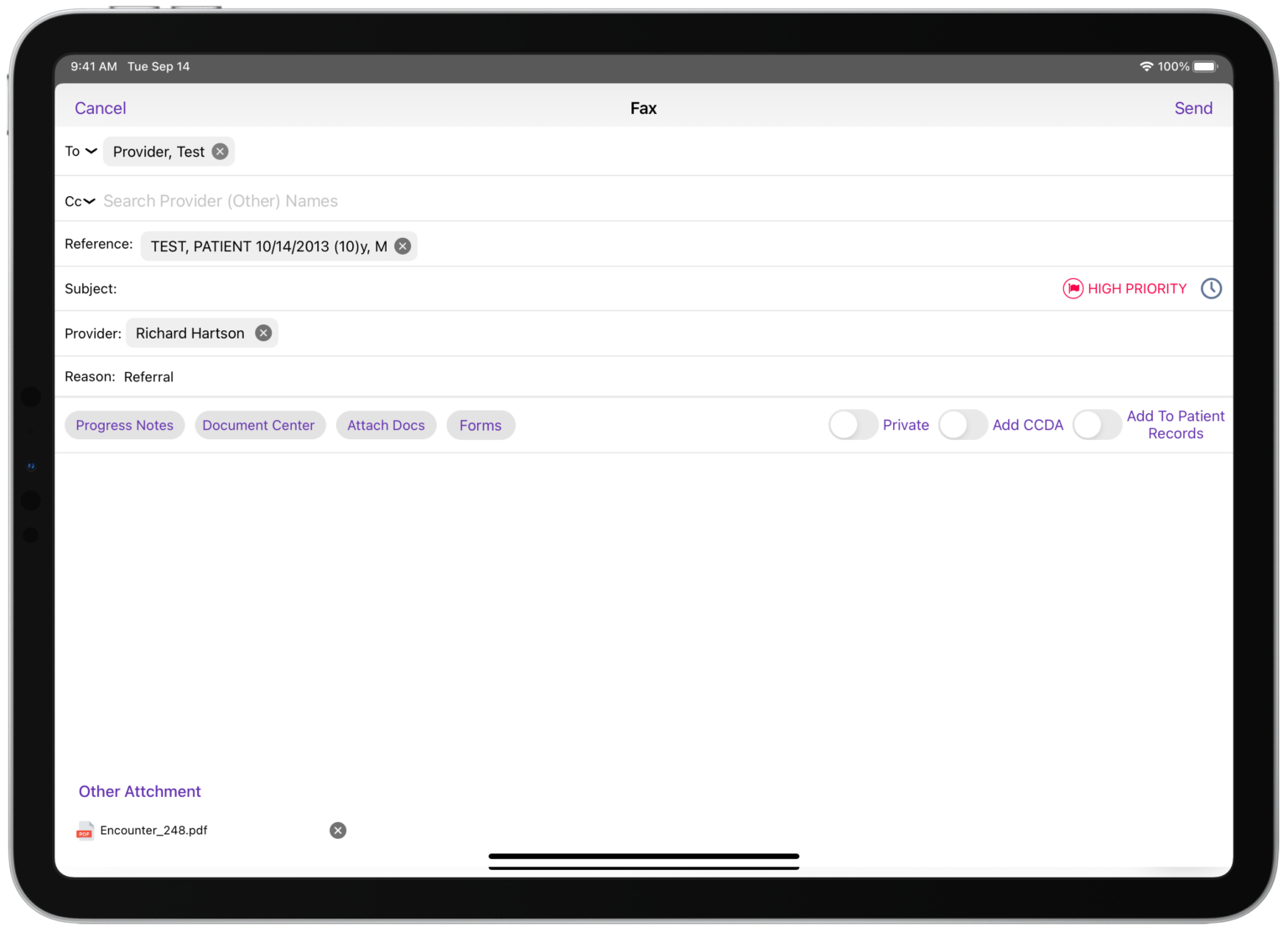


Every fax, filed to the chart.
Healthcare still runs on fax. Lab reports, referrals, insurance authorizations, pharmacy callbacks, records requests, they all come in and go out as fax. Althea Smart EHR Cloud Fax keeps the fax number your referring providers already have, and replaces the paper, the machine, the phone line, and the scanning-to-chart with a single integrated workflow.

Inbound: Assign & Attach
Incoming faxes land in the Althea Smart EHR inbox, not a paper tray. Assign to the right staff member with one tap, with a full audit trail of who saw it, who forwarded it, who attached it. And because the inbox lives inside Althea Smart EHR, you can review and triage from any web browser or the iOS app, at your desk, from home, between patients, wherever you are.

Outbound: Send from the Chart
Anywhere you'd print a document in Althea Smart EHR, referral letters, prior authorizations, records releases, pharmacy requests, you can fax it instead. Pre-filled cover sheet, saved recipients, delivery confirmation. No dial tone, no paper, no wasted ink.

Keep Your Number. Or Get a New One.
Your referring providers and pharmacies already have your fax number memorized and saved in their systems. Port it over to Cloud Fax with zero disruption, same number, new delivery. Or start fresh with a new number in the area code of your choice.
From paper tray to patient chart.
In four steps.
One-time setup to move your fax number to the cloud, then every inbound fax follows the same clean path, inbox, assign, review, attach. Your referring providers never know anything changed. Your staff notices immediately.
One-time port of your existing fax number to Althea Smart EHR Cloud Fax, or pick a new number in the area code you want. Your referring providers keep dialing the same number.

Inbound faxes arrive in the Althea Smart EHR Cloud Fax inbox as PDFs. Your staff gets notified, no more paper tray, no more missed faxes buried on the machine. And the inbox is accessible from any web browser, on any device, or in the native iOS app on iPhone, iPad, and Mac.

Assign the fax to the right staff member with one tap, medical records, billing, scheduling, a specific provider. Every assignment is tracked in a full audit trail.

Match the fax to the patient and attach it to the chart in two taps. No printing. No scanning. No uploading. The document goes straight from the sender into the patient record.
See the transformation.
Same inbound referral, two very different journeys from sender to patient chart. One involves a paper tray, a stamp, and a Xerox machine. The other takes about twenty seconds.
 Old Way
  Althea Smart EHR Cloud Fax
 Independently Rated. Federally Certified.
Physician Approved.



Althea Smart EHR Cloud Fax
The essentials, phone numbers, compliance, workflow, and pricing, answered briefly.
Yes. Most practices port their existing fax number to Althea Smart EHR Cloud Fax with zero disruption, referring providers, pharmacies, and labs keep dialing the same number they always have, and it now lands in the Althea Smart EHR inbox instead of the paper tray. Porting typically completes in 1–2 weeks.
You can pick a new fax number in the area code of your choice and have it live the same day. Many practices add a new Cloud Fax number alongside their existing one, useful for new locations, a dedicated billing line, or separating inbound referrals from records requests.
Yes. All faxes are encrypted in transit and at rest, MD Synergy signs a BAA with every practice, and every fax access and assignment is logged for audit. Faxes never sit on a shared paper tray, they’re only visible to authorized staff inside Althea Smart EHR.
Inbound faxes arrive as PDFs in the Althea Smart EHR Cloud Fax inbox, with notification to the designated staff. From there, a staff member can assign the fax to a colleague, attach it to a patient chart, or both, all with one or two taps and a full audit trail of every action. The inbox is fully accessible from any web browser on any device, and in the native iOS app on iPhone, iPad, and Mac, so providers can review and triage their faxes from anywhere: the clinic, from home, or between patients.
Anywhere in Althea Smart EHR that offers a Print option, the chart, a lab result, a referral letter, a records release, a prior auth form, you can Fax instead. Choose a saved recipient or enter a new fax number, add a cover sheet, send. Delivery confirmation posts back to the chart.
Every fax carries a full audit trail, who received it, who was assigned, who reassigned it, who attached it, who sent outbound. Administrators can review the log anytime. This is especially useful for practices with multiple staff roles handling records, billing, and scheduling.
Practices typically retire their fax machine, its dedicated phone line, the toner, the paper, and the maintenance contract. Add the staff hours spent sorting, scanning, and filing, and the per-page cost of Cloud Fax is a fraction of the all-in cost of running a traditional fax machine.
Retire the fax machine. Keep the fax number.
A 15-minute live demo is the fastest way to see Althea Smart EHR Cloud Fax in action with your own workflow.
Schedule Your Free Demo